
Sharraxaad
Safe Sites provides advanced security features to help keep your WordPress website safe from threats. With real-time monitoring, detailed security insights, and easy-to-use permission management, you can ensure your site is always protected.
Key Features
- Two-Factor Authentication (2FA) – Secure your login with TOTP-based 2FA.
- Smart File Permission Control – Easily manage file permissions based on your server type (Windows/Linux).
- Visual File Permissions Map – See a color-coded structure of your site’s file security.
- Malware Scanner – Analyze your domain, URLs, and HTML security headers for vulnerabilities via VirusTotal.
- Security Dashboard – View a complete overview of your site’s security health.
- Plugin & Theme Security – Detect vulnerabilities in plugins and themes and receive alerts.
- Login & User Security – Monitor login attempts and manage user sessions.
- Site Hardening – Apply recommended security tweaks to your WordPress installation.
- Code Signing – Verify the integrity of your plugin files.
Detailed Features
General Security & Server Health:
- SSL Status – Check if SSL is active for secure connections.
- Site Health & Server Info – Displays PHP version, database version, and server details.
- Panic Mode – Quickly lock down your site in case of an emergency.
Access & User Security:
- Two-Factor Authentication (2FA):
- TOTP Support – Use Google Authenticator, Authy, or any TOTP app.
- Configurable for All Roles – Require 2FA for specific user roles.
- Backup Codes – Generate backup codes for emergency access.
- Login Monitoring – Track failed login attempts and monitor user activity.
Security Monitoring & Protection:
- File Permissions Management:
- Windows Servers – Show file read/write permissions.
- Linux Servers – Display numeric file permissions along with current and recommended settings.
- Fix Permissions – Select files and fix incorrect permissions directly.
- Visual File Permission Map – Interactive file structure with security indicators.
- Hardening – One-click security hardening for common WP vulnerabilities.
- Code Signing – Ensure plugin files haven’t been tampered with.
Malware & Security Scanner:
- Domain & URL Analysis – Scan domain and URLs for malware using VirusTotal API.
- Security Header & DNS Scan – Check security headers and DNS settings.
- Alert System – Receive alerts for detected threats.
WordPress Management & Security:
- Plugin & Theme Security:
- Vulnerability Scanner – Check for known security flaws.
- Inactive Plugin Alerts – Warns about inactive components that pose risks.
- Security Dashboard – A centralized panel for all security settings.
External Services Used
Safe Sites relies on the following third-party services for security analysis and malware detection. Below is a detailed breakdown of what each service does, what data is sent, and where you can review their policies:
1. VirusTotal API
Purpose: Used to scan domain, URLs, and file hashes for malware detection and security threats.
What data is sent & when?
– When a user initiates a manual malware or URL scan, the plugin sends the target URL or domain to VirusTotal for analysis.
– No user private data is sent—only the target URLs/domains or hash values of files are transmitted.
Terms of Service & Privacy Policy:
– VirusTotal Terms of Service
– VirusTotal Privacy Policy
Sawir-shaashado
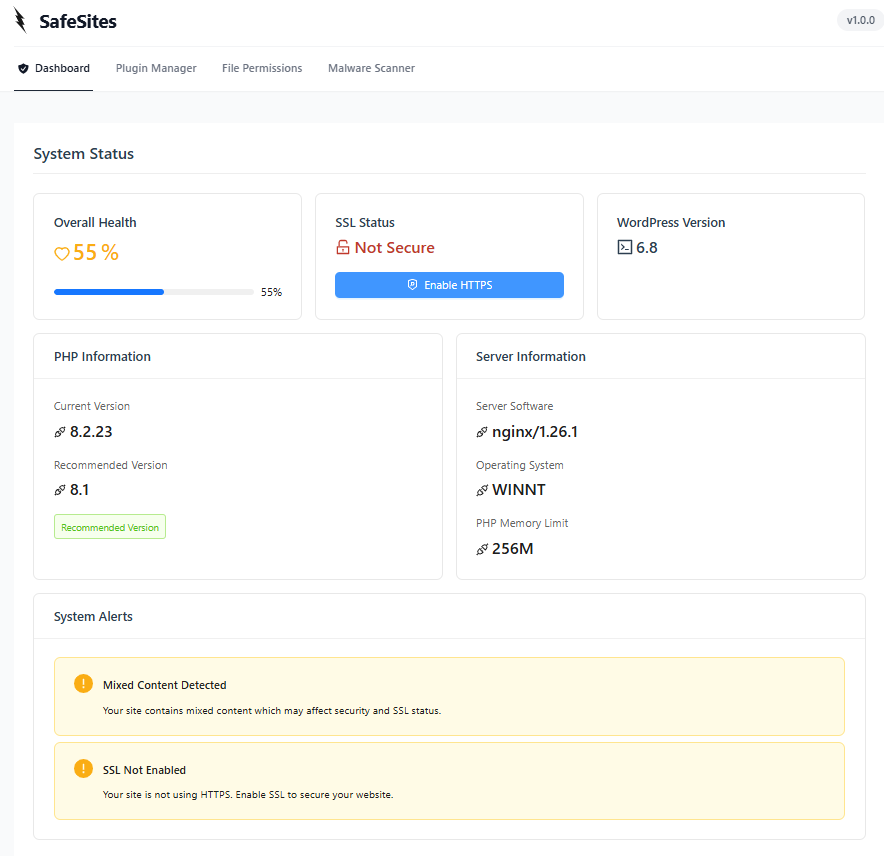
Dashboard Overview – Complete security status summary 
2FA Configuration – Secure your account with TOTP 
Malware Scanner – URL and Domain security analysis 
File Permissions – Monitor and fix file permissions 
Code Signing – Verify the integrity of your plugin files
Xayndaabyo
Kaabahani wuxuu bixinaya 1 xayndaab.
- Demo Block Demo block scaffolded with SafeSites.
Rakibaad
- Download the plugin from WordPress.org.
- Upload the
safe-sitesfolder to the/wp-content/plugins/directory. - Activate the plugin via the WordPress ‘Plugins’ menu.
- Navigate to the “Safe Sites” menu in your WordPress dashboard.
- Configure your security settings and start monitoring.
SBI
-
Is Safe Sites compatible with my hosting environment?
-
Yes! Safe Sites works with all major hosting providers and is compatible with Apache, Nginx, and LiteSpeed servers. It requires WordPress 6.0+ and PHP 8.0+.
-
Does Safe Sites affect site performance?
-
No, Safe Sites is optimized for performance. It uses intelligent caching and efficient scans to minimize server load.
-
How often should I run malware scans?
-
We recommend weekly scans, but Safe Sites continuously monitors your site for threats. You can also schedule or manually run scans anytime.
Dibu-eegisyo

Ka-qaybgalayaasha & Horumariyayaasha
“Safe Sites” waa softiweer il furan. Dadka soo socda ayaa wax ku biiriyay kaabahan.
Ka-qaybgalayaasha
Ku tarjun “Safe Sites” luqaddaada.
Ma xiisaynaysaa horumarinta?
Baadh koodka, fiiri bakhaarka SVN, ama iska qor diiwaanka horumarinta adigoo adeegsanaya RSS.
Isbeddellada
1.0.1
- Added Two-Factor Authentication (2FA) support
- Added site hardening and code signing
- Improved VirusTotal malware scanning integration
- Fixed minor security vulnerabilities
1.0.0
- Initial release
- Implemented core security monitoring features
- Added real-time threat detection
- Integrated malware scanning capabilities
- User activity monitoring
- Plugin and theme vulnerability scanning