

Sharraxaad
Build complete WordPress pages with AI, from a single sentence. Pagora AI is an AI page builder that turns a plain-language description into a finished, ready-to-publish page: layout, copy, styling, images and animations included. No blocks to drag, no page builder to learn.
Type “a landing page for my bakery with a hero, a menu and a contact form”, review the result, publish. Want a change? Keep chatting (“make the hero darker”, “add a pricing table”, “shorten the intro”) or open the built-in code editor and edit the HTML, CSS and JavaScript yourself.
🚀 Free to install. Your first page generation is free, no credit card required.
🔍 Why choose Pagora AI?
Most AI website builders lock you into their own platform or their own block system. Pagora AI runs inside WordPress and gives you real HTML, CSS and JavaScript you own. Beginners get a no-code, chat-driven page builder. Developers get full control of the generated code. No black box, no lock-in.
What you can build in minutes:
- ⚡ Landing pages that convert: hero, benefits, testimonials, pricing, FAQ, call to action.
- 🏠 Homepages for small businesses, agencies, freelancers, restaurants, coaches and local services.
- 🛒 Product pages and sales pages with feature grids, comparison tables and buy buttons.
- 🚀 Coming soon and waitlist pages with email capture.
- 🎨 Portfolio pages, about pages, service pages, event pages and contact pages.
- 📈 SaaS and startup pages with modern animations and clean typography.
✨ Key features
- 🧠 AI page generator: describe any page in natural language and get a complete page with layout, copy, styling and animations.
- 💬 Refine by chat: ask for changes in plain English and the AI updates the page for you, section by section.
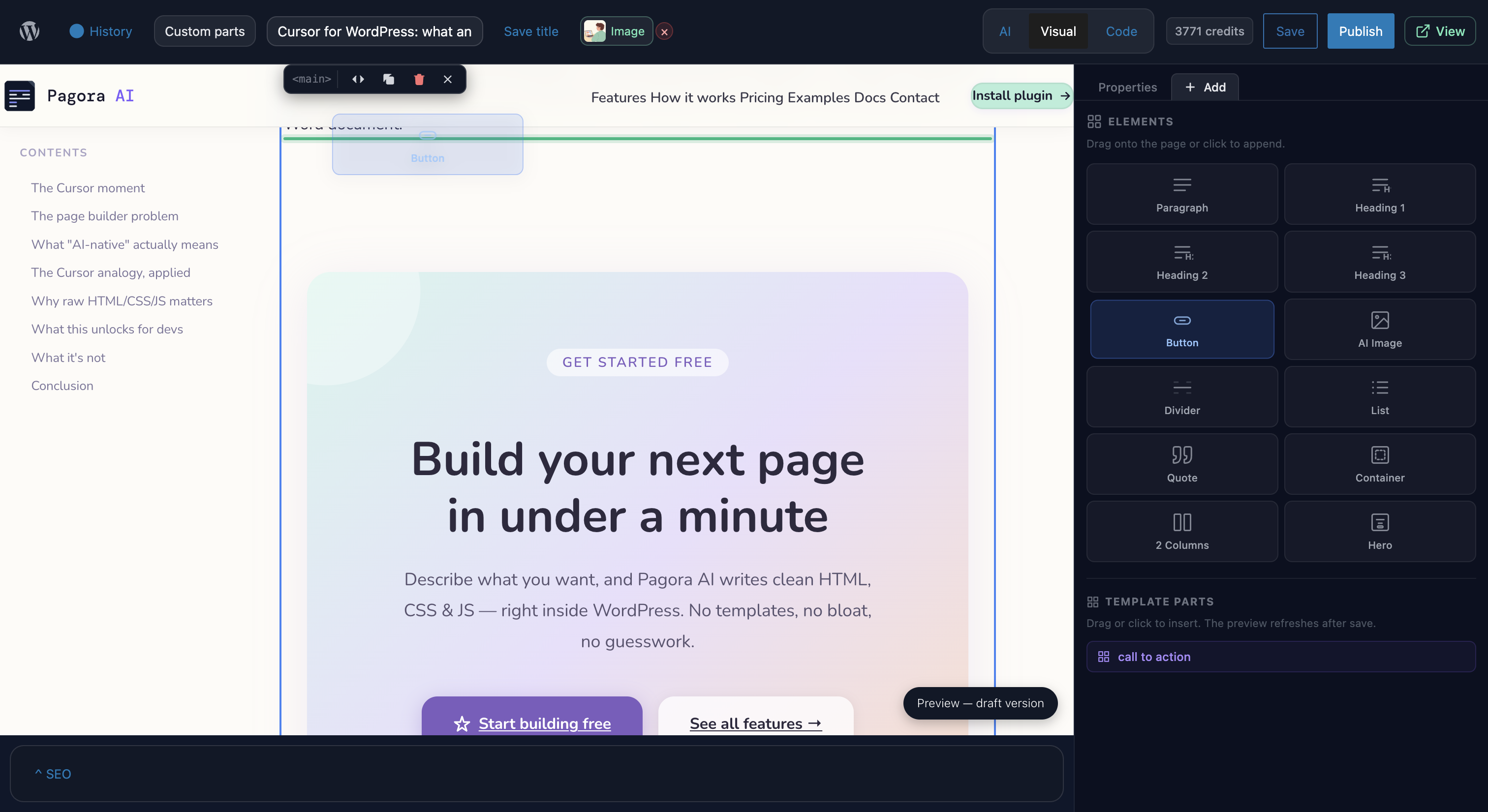
- 🧑💻 Built-in code editor: a Cursor-style editor (CodeMirror) with HTML, CSS and JavaScript syntax highlighting, auto-formatting and keyboard shortcuts. Your manual edits and the AI edits work side by side.
- 👀 Live preview: an isolated preview that updates instantly after every AI response or code change.
- 🕘 Version history: every save creates a snapshot. Restore any previous version in one click.
- 🖼️ AI image generation: generate unique, royalty-free images and insert them directly from the editor. No stock photo hunting.
- 🔎 Built-in SEO panel: set the title, meta description and featured image for every page.
- 📦 Reusable templates: save any page as a template and reuse it across your site.
- 🎞️ Modern interactivity included: generated pages ship with Alpine.js, Motion One and UnoCSS (Tailwind-style utility classes) for smooth animations and declarative behaviour, with no extra plugins to install.
- 🛡️ Theme safe: Pagora AI only takes over the pages where you activate it. Every other page and your theme stay exactly as they are.
- ⚡ Cache friendly: hashed asset filenames plus cache purge integrations for WP Rocket, W3 Total Cache and LiteSpeed Cache.
“Perfect for freelancers, agencies and site owners who need a landing page today, not next week.”
💳 Free trial and pricing
The plugin is free to install. Page generation is powered by the Pagora AI cloud service, which you connect from the plugin settings. New accounts get a free generation to build a first page before committing, then continue on a paid Pagora AI plan with monthly credits. Full pricing is available at pagora-ai.com.
⚙️ How it works
This plugin is a client for the Pagora AI service. No AI model runs on your server.
- Install and activate the plugin.
- Create an account at pagora-ai.com and connect it from Settings Pagora AI.
- Open any WordPress page and click Edit with Pagora AI.
- Describe the page you want in the chat, refine it and publish.
Data and privacy
This plugin connects exclusively to the Pagora AI service (https://api.pagora-ai.com) to process your prompts and generate page code. No data is sent to any other third party.
- Prompts and generated code transit through our servers for processing.
- See our Privacy Policy and Terms of Service.
- The plugin collects no telemetry of its own.
For developers
Pagora AI generates standalone pages that only override theme rendering where you explicitly activate them. Under the hood: page content is stored in post meta with separated HTML, CSS and JS for draft and published states, compiled assets are written with hashed filenames to wp-content/uploads/pagora-ai/, and header, footer and custom template parts are inserted via named placeholders. A complete REST API is available under pagora-ai/v1/.
Bundled libraries
All bundled libraries are GPL-compatible:
- UnoCSS Runtime: MIT
- Alpine.js: MIT
- Motion One: MIT
- CodeMirror: MIT
- Symfony DomCrawler / CssSelector: MIT (isolated via php-scoper)
- Masterminds HTML5-PHP: LGPL-2.1
Source code and build instructions
The JavaScript and CSS bundles are compiled from TypeScript/TSX source. The full, unminified source is public at:
https://github.com/Enkic/pagora-ai-plugin
To build from source:
- Clone the repository.
- Run
npm install. - Run
npm run buildto compile bundles intoassets/build/andassets/editor/build/.
Build tool: Webpack (via @wordpress/scripts). Node 18+ required.
Support
For support, documentation and feature requests, please visit https://pagora-ai.com
Thank you for choosing Pagora AI!
Sawir-shaashado


Rakibaad
- Install Pagora AI via the WordPress.org plugin directory, or upload the ZIP via Plugins Add New Upload Plugin.
- Activate the plugin from the Plugins menu.
- Go to Settings Pagora AI and connect your account.
- On any page, click Edit with Pagora AI to start building.
SBI
-
How do I create a WordPress page with AI?
-
Install Pagora AI, connect your account, open any page and click Edit with Pagora AI. Describe the page you want in the chat and the AI generates the full page. Refine it by chatting or by editing the code directly, then publish.
-
Is Pagora AI a no-code page builder?
-
Yes, and more. You can build an entire page without touching code, purely by describing it in the chat. Unlike most no-code builders, Pagora AI also lets you open the generated HTML, CSS and JavaScript and edit it directly, so it works for beginners and developers alike.
-
Can I build landing pages with Pagora AI?
-
Yes. Landing pages are the most common use case. Describe your offer and target audience, and the AI generates a complete, conversion-focused landing page you can publish or refine.
-
Is the plugin free to try?
-
Yes. The plugin is free to install and every new account gets a free generation to build a first page. No credit card required. After that, generation continues on a paid Pagora AI plan.
-
Do I need my own OpenAI or API key?
-
No. All AI processing runs on the Pagora AI service. You do not need a separate ChatGPT, OpenAI or Anthropic subscription. Everything is included in your plan.
-
Does it work with my theme (Astra, Kadence, GeneratePress, OceanWP, Twenty Twenty-Five)?
-
Yes. Pagora AI works with any theme. On the pages where you activate it, Pagora AI renders its own layout so the page looks exactly as generated, regardless of theme. Your other pages keep using your theme as usual.
-
Can I use Pagora AI alongside Gutenberg, Elementor or Divi?
-
Yes. Pagora AI only replaces rendering on the specific pages where you enable it. You can keep building the rest of your site with Gutenberg, Elementor, Divi or any other builder.
-
Is Pagora AI compatible with WooCommerce?
-
Pagora AI can generate product and sales pages with feature grids, pricing tables and call to action buttons linking to your WooCommerce products. It does not replace the WooCommerce product templates themselves.
-
Can I edit the HTML, CSS and JavaScript?
-
Yes. The built-in CodeMirror editor gives you full access to the generated code with syntax highlighting and auto-formatting. Your manual edits and AI edits work side by side, and every save is versioned.
-
Can I generate images with AI?
-
Yes. You can generate images from a text prompt directly in the editor and insert them into your page.
-
Will Pagora AI break my theme?
-
No. Pagora AI only replaces theme rendering on the specific pages where you activate it. Every other page and your theme stay exactly as they are.
-
Are Pagora AI pages compatible with caching plugins?
-
Yes. Compiled assets use hashed filenames, and the plugin includes cache purge integrations for WP Rocket, W3 Total Cache and LiteSpeed Cache.
-
What happens if I deactivate or uninstall the plugin?
-
If you deactivate it, Pagora AI pages display their content normally through your active theme. No data is lost. Uninstalling removes plugin options, page metadata, user tokens and generated asset files in
uploads/pagora-ai/. Your WordPress page content is preserved. -
What WordPress capabilities are required?
-
Access to the editor requires the
unfiltered_htmlcapability (typically Administrators). Settings management requiresmanage_options.
Dibu-eegisyo

Ka-qaybgalayaasha & Horumariyayaasha
“Pagora AI | AI Page Builder & Landing Page Generator” waa softiweer il furan. Dadka soo socda ayaa wax ku biiriyay kaabahan.
Ka-qaybgalayaasha
Ku tarjun “Pagora AI | AI Page Builder & Landing Page Generator” luqaddaada.
Ma xiisaynaysaa horumarinta?
Baadh koodka, fiiri bakhaarka SVN, ama iska qor diiwaanka horumarinta adigoo adeegsanaya RSS.
Isbeddellada
1.0.5
- Improved page generation reliability and editor stability.
1.0.4
- Bug fixes and stability improvements.
1.0.3
- Editor and live preview improvements.
1.0.2
- Credit handling refinements and minor fixes.
1.0.1
- Credit system updates.
1.0.0
- Initial public release.
- Full AI editor with chat, live preview and code editor.
- Version management and snapshots.
- AI image generation and insertion.
- Built-in SEO panel.
- Reusable template system.
- Alpine.js, Motion One and UnoCSS bundled for generated pages.
- Complete REST API under
pagora-ai/v1/. - Cache purge integrations (WP Rocket, W3TC, LiteSpeed).