
Sharraxaad
Simple login lock down is a way to protect your WordPress blog from brute force login attacks.
How it works:
1. An attacker attempts to login and fails
2. Simple Login Lockdown record that failed login
3. After a certain number of failed attemps (defaults to five), further attemps to access the wp-login.php page are blocked for a time (defaults to one hour).
If you happen to forget your password and make a failed login attemp yourself, the plugin will clear out the lockdown count data on successful login.
Note: This uses $_SERVER[‘REMOTE_ADDR’] directly. If you’re behind a proxy (load balancer, etc), it’s not going to work as expected. Eg. Several folks could be attempting logins at once, and all fail. As such, the plugin would pick up on all those requests coming from the same IP — the load balancer — and lock the login down. No good. If you’re using a load balancer or in some other situation where you’re behind a proxy, use this as an example and write your own. Or filter the IP as your desire using cd_sll_pre_ip.
Hooks
simple_login_lockdown_ip -- Alter the requesting IP address. Might be useful if you site is behind a proxy or load balancer.

simple_login_lockdown_allow_ip -- Allows you to "whitelist" an IP address. It first when a log attempt fails before the attempt count is incremented. Return true and no count will be taken for the IP.

simple_login_lockdown_should_die -- A filter that allows you to prevent the login page from `die`ing if a the requesting IP is temporarily blacklisted or the login limit has been reached.

simple_login_lockdown_count_reached -- Fires when the requesting IP has reached its count and will be added to the blacklist for your time limit.

simple_login_lockdown_attempt -- Fires when a login attempt is made but the requestin IP is blocked to to excessive requests.

simple_login_lockdown_response -- Change the HTTP response code of that gets sent when a blacklisted IP attempts to login.

simple_login_lockdown_time_values -- Allows you to alter values in the login lockdown time dropdown in the admin area.
Sawir-shaashado
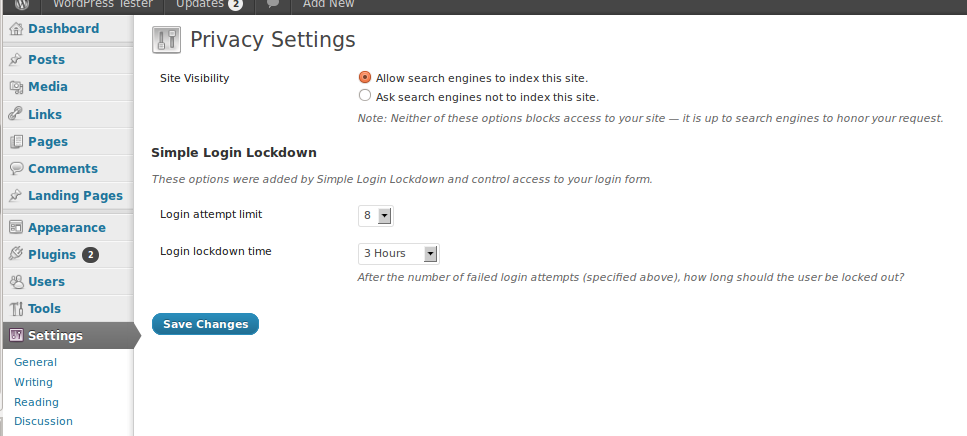
The plugin options on the Privacy Settings page
Rakibaad
Install via the WordPress admin or…
- Click on the big orange button that says download
- Unzip the file, and upload the
simple-login-lockdownfolder to your wp-content/plugins directory - Login into your website and activate the plugin!
SBI
- Installation Instructions
-
Install via the WordPress admin or…
- Click on the big orange button that says download
- Unzip the file, and upload the
simple-login-lockdownfolder to your wp-content/plugins directory - Login into your website and activate the plugin!
- I got locked out, what do I do?
-
Simple answer: wait. The lockdown will clear in the time you specified, just visit the site again later.
If you absolutely need to get into your site right now, you can can do one of two things…
1. Fire up your FTP client and rename thesimple-login-lockdownplugin folder
2. Login into your favorite database administration tool (probably PHPMyAdmin) and search forlocked_down_in theoption_namecolumn of thewp_optionstable. Delete the records you find — they should be “transients”.
Dibu-eegisyo
Ma jiraan wax dibu-eegis ah oo ku saabsan kaabahan.
Ka-qaybgalayaasha & Horumariyayaasha
“Simple Login Lockdown” waa softiweer il furan. Dadka soo socda ayaa wax ku biiriyay kaabahan.
Ka-qaybgalayaasha
“Simple Login Lockdown” waxaa lagu tarjumay 1 luqad. Way ku mahadsan yihiin turjumaannada ka-qaybqaadashadooda.
Ku tarjun “Simple Login Lockdown” luqaddaada.
Ma xiisaynaysaa horumarinta?
Baadh koodka, fiiri bakhaarka SVN, ama iska qor diiwaanka horumarinta adigoo adeegsanaya RSS.
Isbeddellada
1.1
- Fixed a bug that caused lock down length to be much shorter than expected
- Fixed some warnings in the admin area due to a non-existed class property
1.0
- Refactored code
- Added a ton of filters/actions
0.4
- Added plugin options page
0.3
- small bug fix
0.2
- New function to get the IP address.
- Added filter to IP for flexibility with proxies, etc.
0.1
- Proof of concept
- no options page