
Sharraxaad
Calculate the exact time between two dates or events with our Time Duration Calculator. Easily track work hours, project lengths, and elapsed time instantly.
Add the calculator to any page, post or widget area with the shortcode [ci_time_duration_calculator].
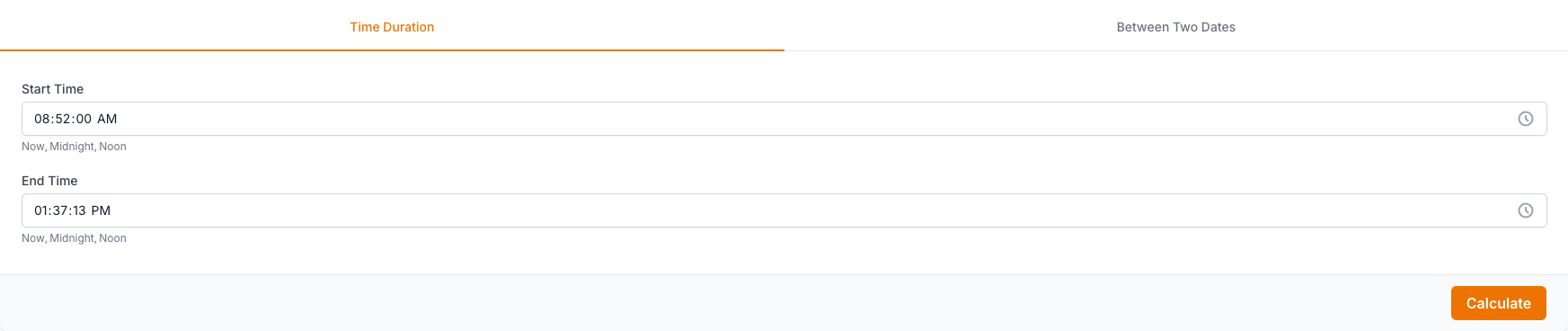
What you enter: Start Time, End Time, Start Date, End Date.
What you get: Time Duration, TIME.
Features:
- Works as soon as it is activated: no account, no API key and no settings page.
- Calculates in your visitor’s browser. Nothing they type is sent to calculator.io or anywhere else, and the plugin loads no ads, trackers or external scripts.
- Responsive: the form and the results sit side by side on wide pages and stack on narrow ones. The frame resizes itself to fit the calculator.
- Optional light, dark or automatic (follows the visitor’s system setting) theme, a custom accent colour and a maximum width, all set in the shortcode.
- The calculator runs in an iframe, so your theme’s styles cannot break it and it cannot break your theme.
More about this calculator: https://www.calculator.io/time-duration-calculator/
Usage
Add the Time Duration Calculator shortcode to your page, post or sidebar:
[ci_time_duration_calculator]
Or add the following code to your template where you would like the Time Duration Calculator to appear:
<?php echo do_shortcode( '[ci_time_duration_calculator]' ); ?>
All attributes are optional:
title–1(default) shows the calculator heading with its icon,0hides it. Example:[ci_time_duration_calculator title="0"]theme–light(default),dark, orautoto follow the visitor’s light/dark system setting. Example:[ci_time_duration_calculator theme="auto"]accent– an accent colour for buttons and highlights, as a hex value. Example:[ci_time_duration_calculator accent="#2563eb"]max_width– the widest the calculator may be: a number followed bypx,%orrem. The calculator is centred when it is narrower than its column. Example:[ci_time_duration_calculator max_width="720px"]
Attributes can be combined: [ci_time_duration_calculator title="0" theme="auto" accent="#2563eb" max_width="720px"]
Source code and libraries
The plugin’s own JavaScript and CSS are shipped unminified and human-readable: assets/js/*.js (except assets/js/lib/), assets/css/main.css, assets/css/ci-widget.css, assets/css/ci-embed.css and the PHP file. main.css is the compiled, unminified stylesheet of calculator.io. The calculator is also published on the calculator.io website: https://www.calculator.io/time-duration-calculator/
Third-party libraries bundled in assets/js/lib/. Where a file is minified, the readable source is available at the upstream address:
- math.js 3.37.1 (Apache-2.0) –
assets/js/lib/math.min.js, minified build. Source: https://github.com/josdejong/mathjs - marked 15.0.12 (MIT) –
assets/js/lib/marked.min.js, minified build. Source: https://github.com/markedjs/marked - Inputmask 5.0.9-beta.70 (MIT) –
assets/js/lib/input-mask.min.js, minified build. Source: https://github.com/RobinHerbots/Inputmask - lazysizes 5.3.2 (MIT) –
assets/js/lib/lazysizes.js. Source: https://github.com/aFarkas/lazysizes - Air Datepicker 3.3.0 (MIT) –
assets/js/lib/air-datepicker.js. Source: https://github.com/t1m0n/air-datepicker - Inter font (SIL Open Font License 1.1) –
assets/fonts/inter-v20-latin.woff2. Source: https://github.com/rsms/inter
Sawir-shaashado

Rakibaad
- Upload the /ci-time-duration-calculator/ folder to the /wp-content/plugins/ directory, or install the plugin from the Plugins screen.
- Activate the Time Duration Calculator plugin through the “Plugins” menu in WordPress.
- Add the
[ci_time_duration_calculator]shortcode to a page or post.
SBI
-
How do I add the calculator to a page?
-
Add the shortcode
[ci_time_duration_calculator]to a page or post. In the block editor use a Shortcode block. In a theme template use<?php echo do_shortcode( '[ci_time_duration_calculator]' ); ?>. -
Which shortcode attributes are available?
-
title (1 or 0),
theme(light, dark or auto),accent(a hex colour such as #2563eb) andmax_width(for example 720px, 80% or 40rem). See the Usage section for examples. Invalid values are ignored and the default is used instead. -
How do I get a dark calculator?
-
Use
theme="dark"for always dark, ortheme="auto"to follow the visitor’s light/dark system setting. The default,theme="light", keeps the calculator light on any background. -
Can I hide the heading?
-
Yes. Use
title="0"and the heading with the calculator’s icon is not printed, so you can write your own. -
Does the plugin send data anywhere?
-
No. The calculation happens in the visitor’s browser, nothing they enter leaves the page, and the plugin makes no requests to calculator.io or any other external service. It sets no cookies and loads no ads or trackers.
-
The calculator is the wrong height or has a scrollbar.
-
The frame adjusts its height automatically while the page is open. If your theme or a caching or optimisation plugin removes scripts from the page, the frame keeps a default height; exclude the plugin’s
ci-embed.jsfile from script optimisation. -
How do I calculate the time duration between two times?
-
Enter your start and end times into the single-day calculator, then click “Calculate” to see the exact duration. The “Now” buttons fill in the current time automatically, and the result appears instantly in hours, minutes, and seconds.
-
How do I calculate the time between two dates?
-
Use the time between two dates calculator: enter the start and end month, day, and year, using the calendar popup or “Now” button if needed. You can also add exact start and end times for down-to-the-minute accuracy, then click “Calculate” to get the elapsed time.
-
What result formats does the time duration calculator show?
-
The single-day calculator displays the result as hours, minutes, seconds, decimal hours, and decimal minutes. The two-dates calculator adds days and decimal days, showing the elapsed time in days, hours, minutes, seconds, decimal days, decimal hours, and decimal minutes.
-
How do you manually calculate elapsed time on a 12-hour clock?
-
You first convert both times to 24-hour (military) format before doing the math, so 4:28 PM becomes 16:28 while 7:39 AM stays the same. This calculator performs these multi-step conversions instantly, removing the mental gymnastics of AM/PM math.
-
Does the calculator account for different month lengths and leap years?
-
Yes. Months vary in length and February shifts between 28 and 29 days depending on the leap year cycle, so the tool determines the exact duration automatically. You only enter the starting and ending dates without memorizing which years are leap years.
Dibu-eegisyo
Ma jiraan wax dibu-eegis ah oo ku saabsan kaabahan.
Ka-qaybgalayaasha & Horumariyayaasha
“CI Time Duration Calculator” waa softiweer il furan. Dadka soo socda ayaa wax ku biiriyay kaabahan.
Ka-qaybgalayaasha
Ku tarjun “CI Time Duration Calculator” luqaddaada.
Ma xiisaynaysaa horumarinta?
Baadh koodka, fiiri bakhaarka SVN, ama iska qor diiwaanka horumarinta adigoo adeegsanaya RSS.
Isbeddellada
1.1.0
- New shortcode attributes:
title,theme(light, dark, auto),accentandmax_width - Responsive layout: form and results wrap into one column on narrow pages, wide tables scroll inside their own box
- The frame now follows the calculator’s height when it changes or the window is resized
- Fixed the missing heading icon
- The plugin’s JavaScript and CSS are now shipped unminified
- The WordPress-side script and styles load only on pages that use the shortcode
1.0.1
- Removed leftover files of earlier plugin versions
- Tested up to WordPress 7.1
1.0.0
- Initial release of Time Duration Calculator