

Sharraxaad
splitforms is the simplest way to add working forms to WordPress. No database tables. No SMTP setup. No spam-fighting plugins to layer on top. Drop in your free splitforms access key, place the [splitforms] shortcode on any page, or build custom forms with the visual builder and embed them with [splitforms form="quote"]. Submissions are emailed straight to your inbox by the splitforms form-backend API at https://splitforms.com.
Free forever — 500 submissions/month, no credit card.
If you’ve ever fought with wp_mail(), deliverability, SPF/DKIM, SMTP plugins, contact-form-as-database, or spam-protection-as-a-service, splitforms exists to delete that pain. You paste an access key. You drop a shortcode. Submissions arrive in your inbox. That is the entire setup.
Why splitforms instead of a heavier form plugin?
- Zero database overhead. Submissions go to the splitforms API and get emailed to you — they never touch
wp_options,wp_postmeta, or any custom table. Your site stays fast and your backups stay small. - Honeypot spam protection built in. A hidden honeypot field is included on every form by default — bots fill it, humans don’t, and the splitforms backend rejects the submission.
- Leads stay outside WordPress. Review submissions in the splitforms dashboard instead of storing lead data in your WordPress database.
- Server-side rendered HTML. The form HTML is in your page source. Search engines, screen readers, and form fillers see it natively. No client-side JavaScript required to display the form.
- Lightweight and themeable. Minimal CSS, themed via CSS custom properties. Plays nicely with any theme — override one variable and you’re done.
- Multiple saved forms. Create custom WordPress-side forms like contact, quote, support, or booking, then embed each one with its own shortcode.
- Splitforms dashboard shortcuts. Open your dashboard, submissions, WordPress forms, billing, and settings from inside WordPress.
- Shortcode manager. See every available shortcode in one place and delete saved forms you no longer need.
- Visual form builder. Click to add fields (name, email, phone, message, dropdown, URL, number, date), edit labels, reorder, mark fields required, and pick a style preset — no code needed.
- Live form preview. Preview saved custom forms in Settings before placing the shortcode on a live page.
- Optional reCAPTCHA. Turn on Google reCAPTCHA globally or only for specific saved forms by adding a public site key.
- Multiple forms per page. Stack as many forms on a single page as you like — every shortcode instance gets unique field IDs.
Pricing
- Free — 500 submissions/month, forever, no credit card.
- Pro — $5/month for higher submission volume and advanced routing.
- $59 3-year plan — pay every 3 years, 36 months of Pro.
Sign up at https://splitforms.com to grab your free access key.
Privacy
This plugin is a front-end for the splitforms form-backend service and does not store submissions in WordPress. Form submissions are posted from the visitor’s browser to the splitforms API; the server also fetches your form’s field definition from splitforms.com when a shortcode renders, and if you connect your account the plugin stores a private, revocable connection token plus your account email in your site’s options. See the External Services section below for every remote call. The splitforms service is governed by its Terms of Service and Privacy Policy.
External Services
splitforms is a connector plugin for the splitforms form-backend service (https://splitforms.com). It communicates with the following external services:
splitforms API — required (this is the service the plugin connects to)
- When a visitor submits a form, the data they entered (plus the page URL and your access key) is sent from their browser to
https://splitforms.com/api/submit, which delivers it to your inbox and dashboard. - When a page containing a
[splitforms]shortcode renders, your server fetches that form’s field definition fromhttps://splitforms.com/api/forms/definitionfor your access key (cached for about 5 minutes) so the designed form can be rendered server-side. - If you connect your splitforms account in Settings splitforms, the plugin stores a private, revocable connection token and your account email, used only to link this site to your account.
The splitforms service is provided by splitforms: Terms of Service — Privacy Policy.
Google reCAPTCHA — optional (off by default)
- Only if you enable reCAPTCHA and add a site key in Settings splitforms, pages with an embedded form load Google’s widget script from
https://www.google.com/recaptcha/api.js, and Google processes visitor interactions to verify they are human. - Google’s terms and privacy policy: Terms — Privacy.
No data is sent anywhere else, and nothing is transmitted until a form is rendered or submitted, or you explicitly enable the optional features above.
Sawir-shaashado
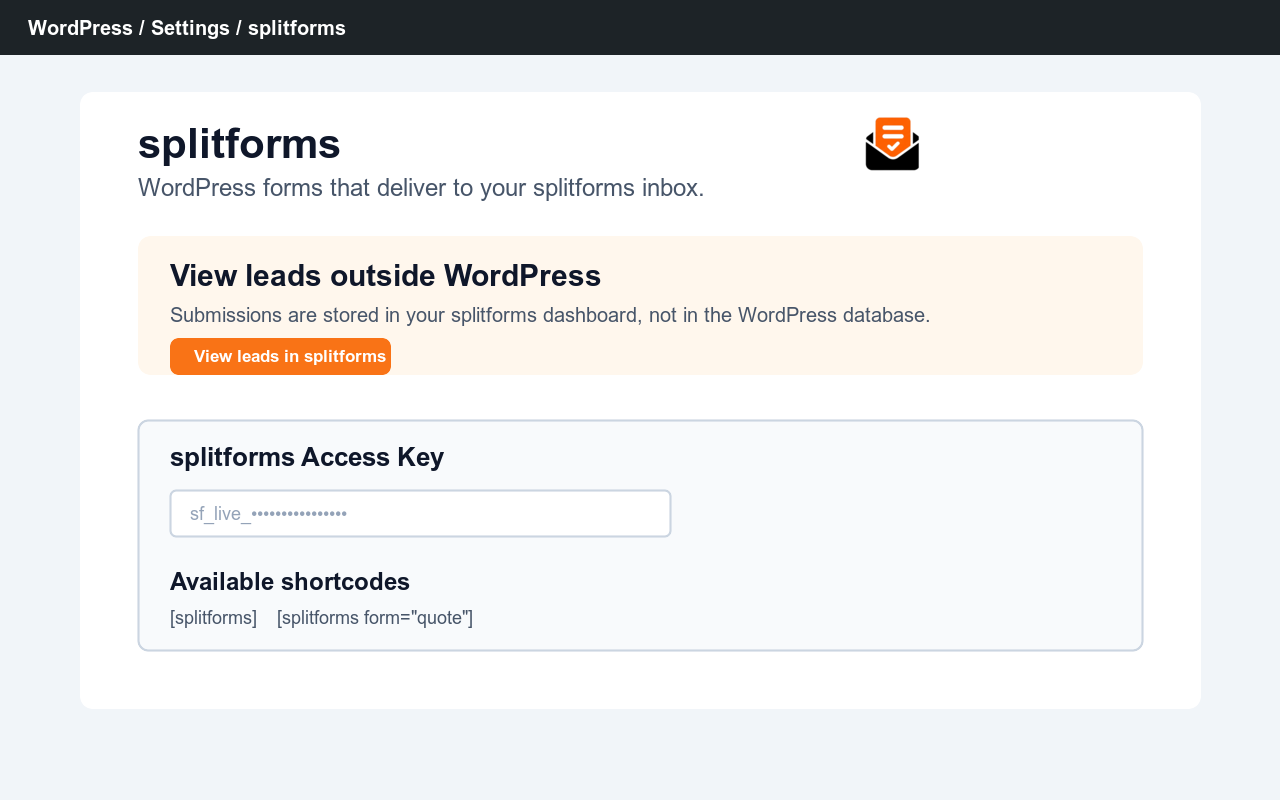 → splitforms — paste your access key and configure defaults.” class=”wp-image-9000001″ srcset=”https://i0.wp.com/ps.w.org/splitforms/assets/screenshot-1.png?rev=3617460&w=300 300w, https://i0.wp.com/ps.w.org/splitforms/assets/screenshot-1.png?rev=3617460&w=600 600w, https://i0.wp.com/ps.w.org/splitforms/assets/screenshot-1.png?rev=3617460&w=900 900w” sizes=”(max-width: 599px) 50vw, 33vw” width=”1280″ height=”800″ loading=”eager” fetchpriority=”high” decoding=”async”/>
![Saved custom forms with reusable shortcodes like [splitforms form="quote"].](https://ps.w.org/splitforms/assets/screenshot-2.png?rev=3617460)
[splitforms form="quote"].![A rendered [splitforms] form on a front-end page.](https://ps.w.org/splitforms/assets/screenshot-3.png?rev=3617460)
[splitforms] form on a front-end page.Rakibaad
- Install splitforms from Plugins Add New in WordPress, or upload the
splitformsfolder to/wp-content/plugins/. - Activate the plugin in Plugins.
- Go to Settings splitforms and paste your access key from https://splitforms.com, then add the
[splitforms]shortcode to any page or post. - Optional: save custom forms in Settings splitforms, then embed them with shortcodes like
[splitforms form="quote"],[splitforms form="support"], or[splitforms form="booking"].
SBI
-
How much does splitforms cost?
-
The free tier includes 500 submissions/month forever, with no credit card required. If you outgrow it, Pro is $5/month or $59 every 3 years for 36 months of Pro.
-
Do I need a server, SMTP credentials, or any other setup?
-
No. splitforms is the form backend — submissions are POSTed to
https://splitforms.com/api/submit, and the splitforms service emails them to the address on your account. You don’t configure SMTP, you don’t add DNS records, you don’t install any other plugin. -
What about spam?
-
Every form ships with a hidden honeypot field (named
botcheck) that catches the majority of automated bots. The splitforms backend also runs additional spam scoring on every submission server-side, so you don’t have to layer on CAPTCHAs. -
Can I turn on reCAPTCHA?
-
Yes. Add your public reCAPTCHA site key in Settings splitforms and enable it globally, or override it per saved form. For secure verification, also add the matching secret key in your splitforms form settings; the WordPress plugin only renders the browser widget and never exposes the secret key.
-
Can I create different forms for different pages?
-
Yes. In Settings splitforms, add saved custom forms with their own slug, subject, redirect, and access key override, then build the fields in the visual builder. Place them with
[splitforms form="quote"],[splitforms form="support"], etc. If a saved form does not set its own access key, it uses the default key. -
Can I style the forms?
-
Yes. Pick a style preset (Minimal, Modern, or Dark) in the visual builder, or theme the plugin’s default look from your theme’s stylesheet — the markup uses stable
splitforms-*classes and CSS custom properties. Shortcode attributes likeaccent,background,border,text, andradiusoffer quick per-form color and radius tweaks. -
Does the plugin support file uploads?
-
Yes. Design your form in the drag-and-drop builder on splitforms.com and add a file-upload field; the
[splitforms]shortcode renders it and submits the uploaded files with the lead. The built-in fallback form (when no designed form exists for your access key) still renders Name, Email, and Message only. -
Can I customise the default form fields?
-
The plain
[splitforms]shortcode renders a simple Name + Email + Message form. For custom fields, save a custom form in Settings and embed it with[splitforms form="your-slug"]. -
Can I change the “From” name on notification emails?
-
Yes — set a Default notification “From” name in Settings splitforms (e.g. “Acme Contact Form”), or pass
from_name="..."per shortcode for per-form overrides. Leave both empty to use the splitforms default.
Dibu-eegisyo
Ma jiraan wax dibu-eegis ah oo ku saabsan kaabahan.
Ka-qaybgalayaasha & Horumariyayaasha
“splitforms” waa softiweer il furan. Dadka soo socda ayaa wax ku biiriyay kaabahan.
Ka-qaybgalayaasha
Ku tarjun “splitforms” luqaddaada.
Ma xiisaynaysaa horumarinta?
Baadh koodka, fiiri bakhaarka SVN, ama iska qor diiwaanka horumarinta adigoo adeegsanaya RSS.
Isbeddellada
1.7.1
- Removes the custom CSS and combined HTML+CSS paste inputs per WordPress.org plugin guidelines. Custom forms are now built exclusively with the visual builder, and its whitelisted field model renders server-side with escaping.
- Style presets (Minimal, Modern, Dark) now ship as static CSS in the plugin stylesheet instead of generated inline style blocks.
- Removes WordPress.org directory asset files from the plugin package.
1.7.0
- Documents every external service call in the readme (splitforms API, optional Google reCAPTCHA) with terms and privacy links.
- Uninstall now also removes the account connection token and cached form definitions.
- Removes leftover code from the retired embedded dashboard.
- Hardens output escaping for saved custom form HTML and CSS.
1.6.1
- Fix: multipart uploads on the no-JS fallback form.
1.6.0
- Forms designed in the new drag-and-drop builder now render fully through the shortcode: file-upload fields and per-field column widths (two fields side by side) are supported. Fields laid out as “Half” in the builder appear side by side on your WordPress page.
1.5.0
- Simplified the plugin: removed the embedded account dashboard. Build and design your forms on splitforms.com, then add them to WordPress with the [splitforms] shortcode (or a self-contained iframe). Each form uses its own key — connect your account or paste a key, and the plugin renders the form.
1.4.0
- The connected dashboard now embeds your real splitforms.com dashboard directly inside wp-admin — the same live submissions, forms, and stats you see on the web, authenticated with your private per-site connection token. Replaces the previous static placeholder dashboard.
1.3.0
- Connected accounts: connect your splitforms account to WordPress (sign in with Google or email), then manage forms and view submissions in an embedded dashboard right inside wp-admin. Build and edit forms in the plugin and they sync to your account; the shortcode renders them automatically. Authenticated with a private, revocable per-site connection token.
1.2.0
- Forms designed in the splitforms dashboard now render automatically in WordPress. The
[splitforms]shortcode fetches the form’s fields and style for its access key from splitforms.com (cached ~5 minutes) and renders them server-side — no HTML to copy or paste. Falls back to the built-in Name/Email/Message form if the site is unreachable or the form has no designed fields. Locally-saved custom forms still take precedence.
1.1.18
- Adds a visual form builder to saved custom forms: click to add fields (name, email, phone, message, dropdown, URL, number, date), edit labels and data keys, toggle required, reorder, and pick a style preset — all with a live preview and no HTML required. A Build / Style / Code tabbed layout keeps the raw HTML editor available for advanced users, and existing pasted-code forms are preserved untouched.
1.1.17
- Redesigns the WordPress settings UI with an embedded splitforms workspace, connection status, dashboard links, copyable shortcodes, cleaner saved-form editing, and a responsive live preview.
1.1.16
- Hardens submission spam filtering.
1.1.15
- Removes pasted Splitforms control fields from custom forms so direct-API snippets do not submit duplicate access keys or metadata.
1.1.14
- Adds a hidden iframe fallback so plugin forms never navigate visitors to the API endpoint if JavaScript submit handling is blocked.
1.1.13
- Explicitly renders every reCAPTCHA widget so multiple splitforms shortcodes on one WordPress page can all submit successfully.
1.1.12
- Adds saved custom form name and slug metadata to submissions so multiple WordPress forms can share one access key and still be identified in splitforms, email, webhooks, and CRM integrations.
1.1.11
- Preserves pasted form tag inline styles and keeps custom form wrappers transparent so custom backgrounds render correctly.
1.1.10
- Stops default plugin input and submit-button styles from overriding pasted custom form designs.
1.1.9
- Removes already-saved pasted enhancement JavaScript from rendered custom forms and previews.
1.1.8
- Renders reCAPTCHA before the submit button, including custom pasted forms with their own button.
1.1.7
- Moves form metadata, page URL stamping, client-side time-trap, and double-submit protection into the plugin script.
- Preserves classes from pasted form tags so custom CSS and live previews keep matching.
- Removes pasted JavaScript snippets from custom form HTML because plugin enhancements are handled safely by the plugin.
1.1.6
- Adds a WordPress settings card and plugin-row link for viewing leads in the external splitforms dashboard.
- Adds polished plugin screenshot assets for distribution.
1.1.5
- Keeps reserved honeypot fields hidden in saved custom forms and live previews.
1.1.4
- Adds an available shortcodes table to Settings splitforms.
- Adds a delete checkbox for saved custom forms.
1.1.3
- Adds a live admin preview for saved custom forms.
- Updates previews as users paste combined HTML/CSS or edit separate HTML and CSS fields.
1.1.2
- Adds a combined HTML + CSS paste box for saved custom forms.
- Extracts style blocks from combined snippets and saves the safe form fields for rendering.
1.1.1
- Adds optional Google reCAPTCHA display settings globally and per saved form.
- Loads the reCAPTCHA script only when an embedded form has reCAPTCHA enabled and a site key configured.
1.1.0
- Adds saved custom forms in Settings splitforms.
- Adds
[splitforms form="slug"]for different forms on different WordPress pages. - Supports custom form HTML and CSS while preserving splitforms hidden fields, honeypot, time trap, AJAX submit, and status messages.
- Allows per-form access key, subject, redirect URL, sender name, and submit button label overrides.
1.0.1
- Adds inline AJAX submission handling with success/error messages.
- Honors the WordPress redirect setting after a successful AJAX submission.
- Loads lightweight frontend CSS/JS for inline AJAX handling.
- Lowers minimum PHP requirement to 7.4.
1.0.0
- Initial release.
- Settings page (Settings splitforms) with access key, default subject, default redirect URL, and default notification “From” name.
[splitforms]shortcode with optionalsubject,redirect,from_name, andclassattributes.- Honeypot spam-trap field (
botcheck) included by default. - Frontend CSS using custom properties for easy theme integration.
- Translation-ready (text domain:
splitforms).