

Sharraxaad
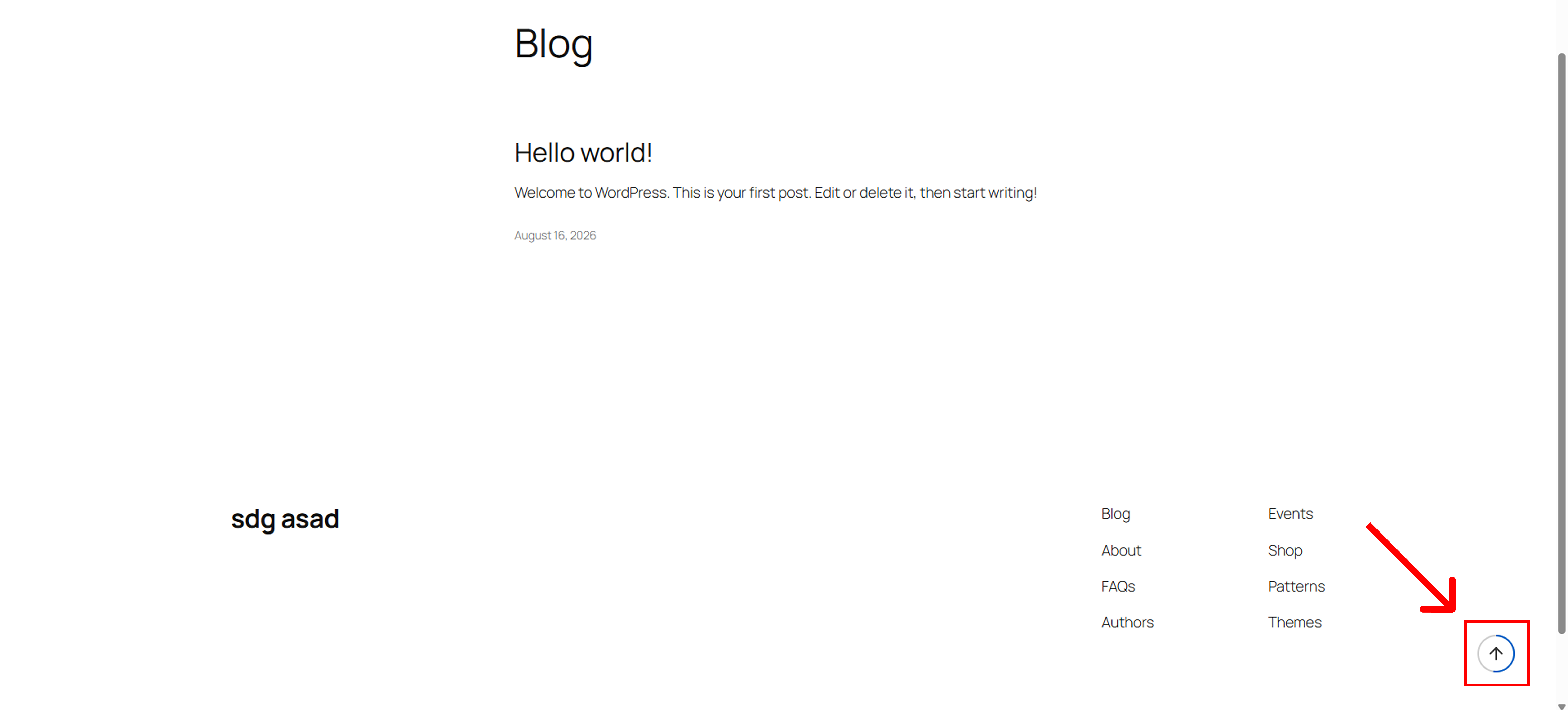
Sudocode Scroll Back To Top is a modern, lightweight, and highly customizable plugin that enhances your website’s user experience. It adds a sleek “Back to Top” button with an interactive, dynamic circular scroll progress indicator.
Built with performance in mind, this plugin uses inline SVGs and avoids heavy images, ensuring your site remains incredibly fast. With comprehensive customization options in the admin panel, you can perfectly match the button to your brand’s design.
Key Features:
- Dynamic Scroll Progress Ring: Visually shows users how far they have scrolled down the page.
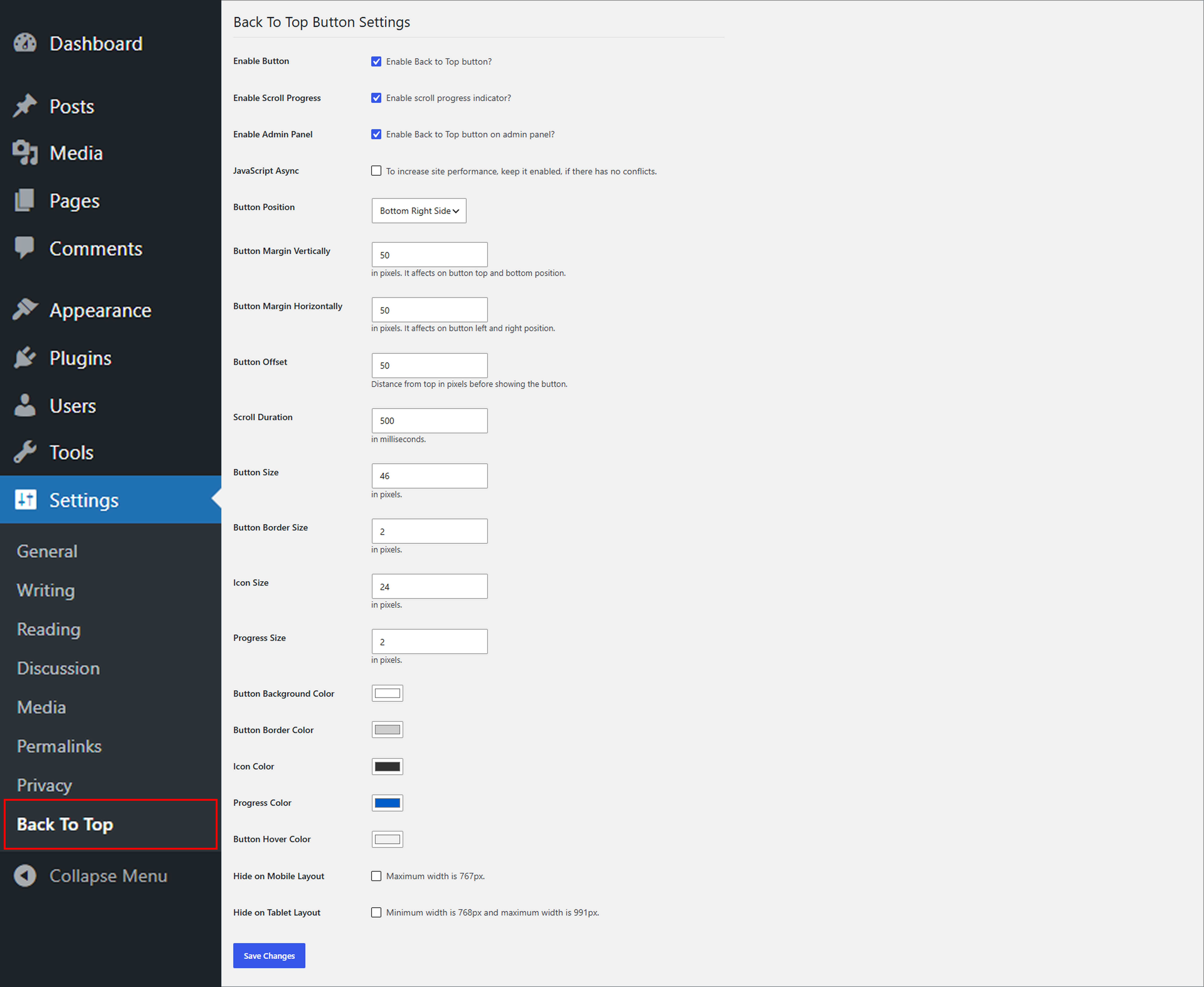
- Highly Customizable: Easily change background colors, border colors, icon colors, and hover effects.
- Position & Size Control: Adjust button size, icon size, margins, and placement (Bottom Right / Bottom Left).
- Smart Display Logic: Hide the button on mobile (max 767px) or tablet (768px – 991px) layouts.
- Performance Optimized: Includes an option to load JavaScript asynchronously (WP 6.3+ compatible) to ensure zero impact on page load speed.
- Admin Panel Support: Optionally enable the back-to-top button within the WordPress admin dashboard.
- Clean & Secure Code: Strictly adheres to WordPress coding standards, sanitization, and escaping rules. No unnecessary bloat.
Whether you run a blog, a WooCommerce store, or a corporate website, Sudocode Scroll Back To Top provides that premium finishing touch to your user navigation.
Sawir-shaashado
Rakibaad
- Go to Plugins > Add New in your WordPress admin dashboard.
- Search for “Sudocode Scroll Back To Top”.
- Click Install Now and then Activate.
- Navigate to Settings > Back To Top to configure the button’s appearance and behavior.
SBI
-
Does this plugin slow down my website?
-
Not at all! The plugin is extremely lightweight. It uses clean CSS/JS and inline SVGs instead of heavy image files. You can also enable the “JavaScript Async” option in the settings for even better performance.
-
Can I change the color to match my theme?
-
Yes, the settings panel provides comprehensive color pickers for the background, border, icon, progress ring, and hover states.
-
Go to Settings > Back To Top, and check the “Hide on Mobile Layout” option. You can do the same for tablet devices.
Dibu-eegisyo
Ma jiraan wax dibu-eegis ah oo ku saabsan kaabahan.
Ka-qaybgalayaasha & Horumariyayaasha
“Sudocode Scroll Back To Top” waa softiweer il furan. Dadka soo socda ayaa wax ku biiriyay kaabahan.
Ka-qaybgalayaasha

Ku tarjun “Sudocode Scroll Back To Top” luqaddaada.
Ma xiisaynaysaa horumarinta?
Baadh koodka, fiiri bakhaarka SVN, ama iska qor diiwaanka horumarinta adigoo adeegsanaya RSS.
Isbeddellada
1.0.0
- Initial Release.
- Added dynamic SVG scroll progress indicator.
- Added comprehensive customization settings (Colors, Sizes, Visibility).
- Added Async JS loading for performance.