

Sharraxaad
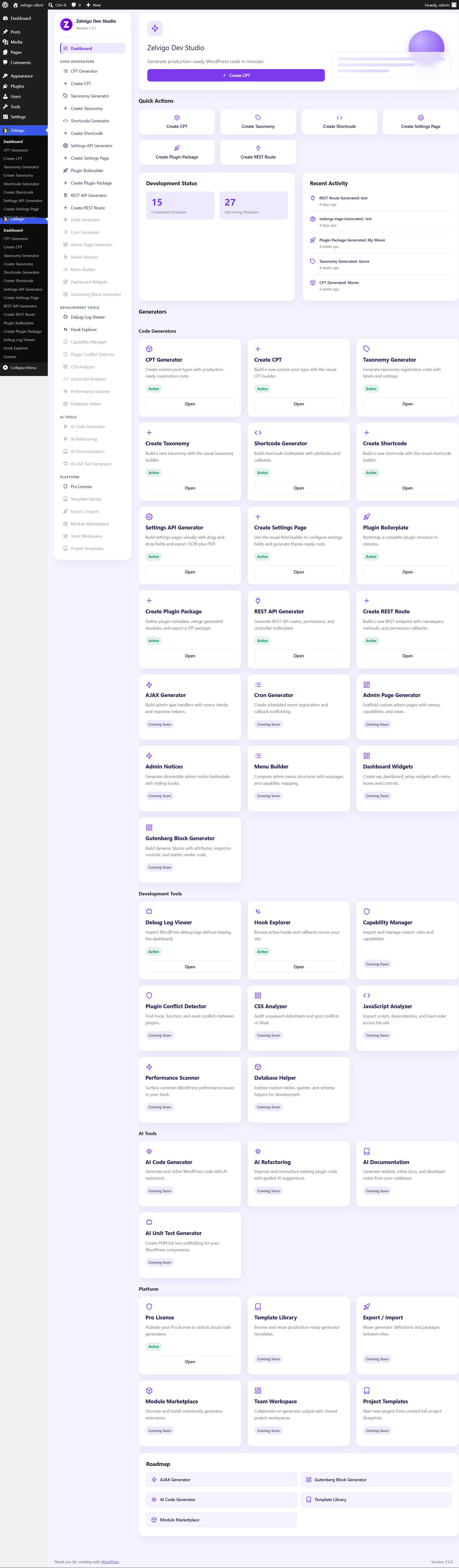
Looking for a WordPress CPT generator or taxonomy generator? Zelvigo Dev Studio Lite is a free developer toolkit built for plugin authors, freelancers, and agencies who create custom post types and taxonomies every week — and are tired of rewriting register_post_type() and register_taxonomy() boilerplate from scratch.
Zelvigo Dev Studio is a complete WordPress development workspace. Lite gives you four essential tools for free, runs entirely on your site with no API calls, and is the starting point for a growing platform of code generators, inspection tools, and AI-assisted development features.
Why developers install Zelvigo Dev Studio Lite
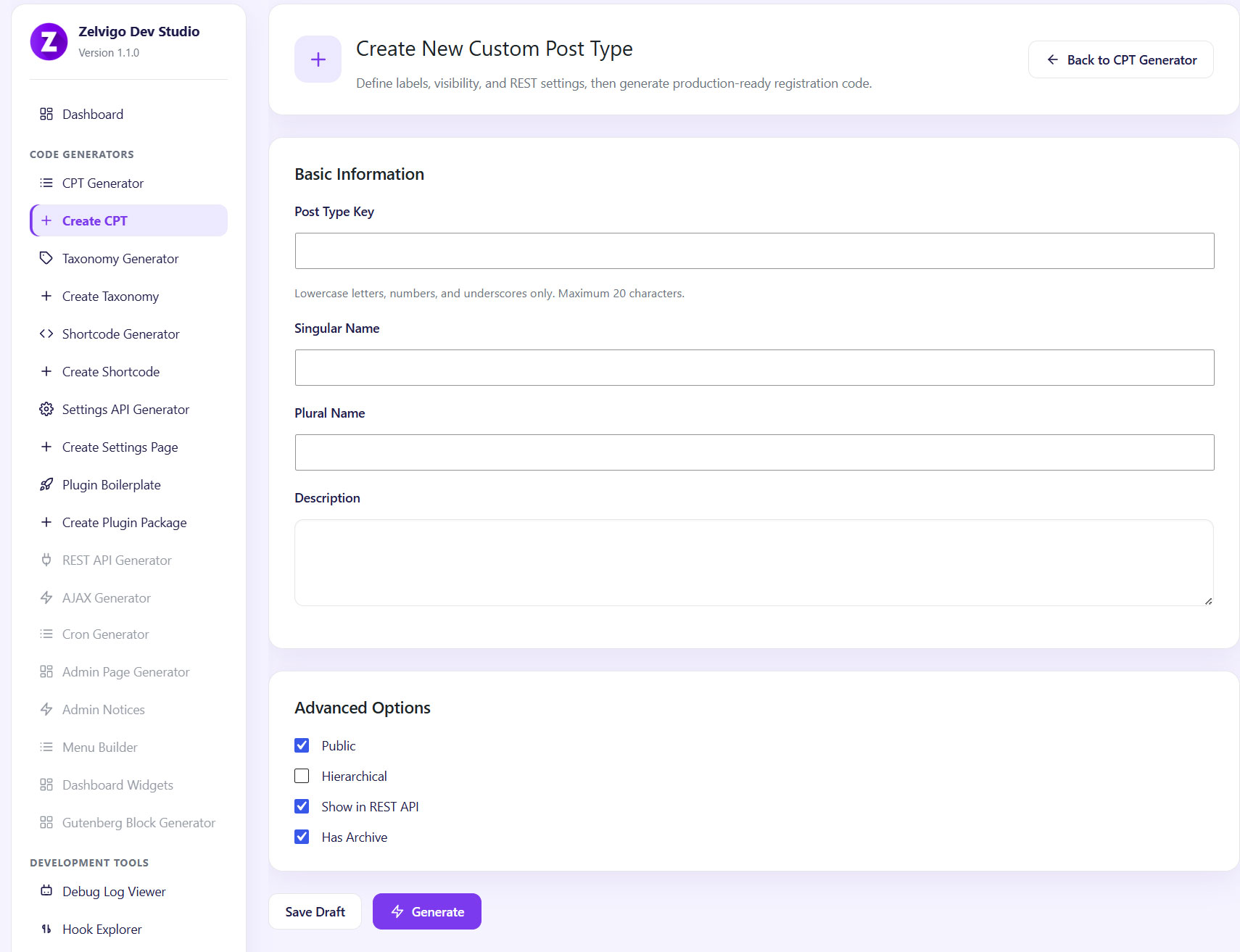
- Create custom post type (CPT) code in minutes — labels, slugs, REST API support, archives, hierarchical options, menu icons, and more
- Generate taxonomy registration code — link taxonomies to any post type, set hierarchy, REST endpoints, and admin columns
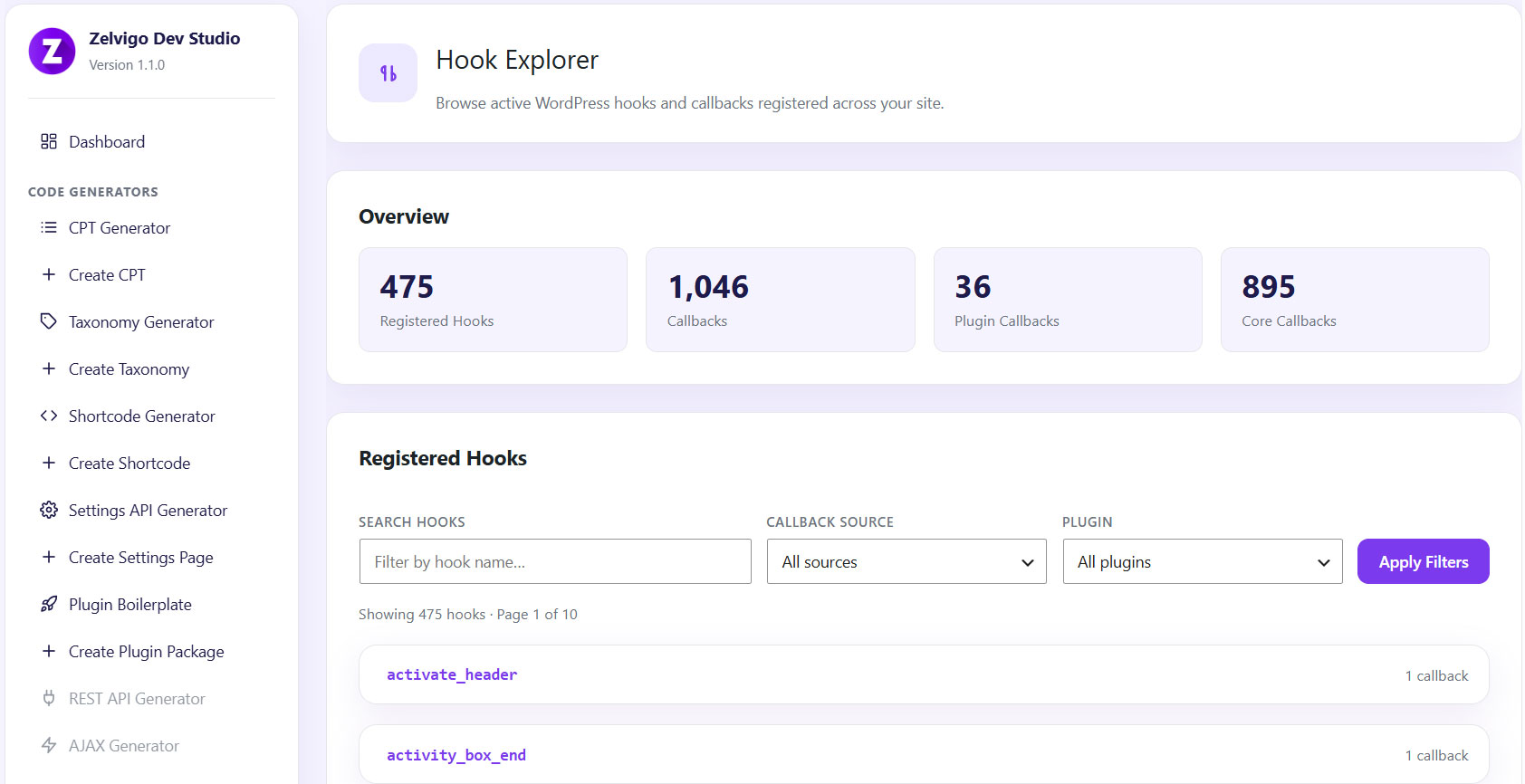
- Inspect hooks on your live site — browse registered actions and filters without digging through code
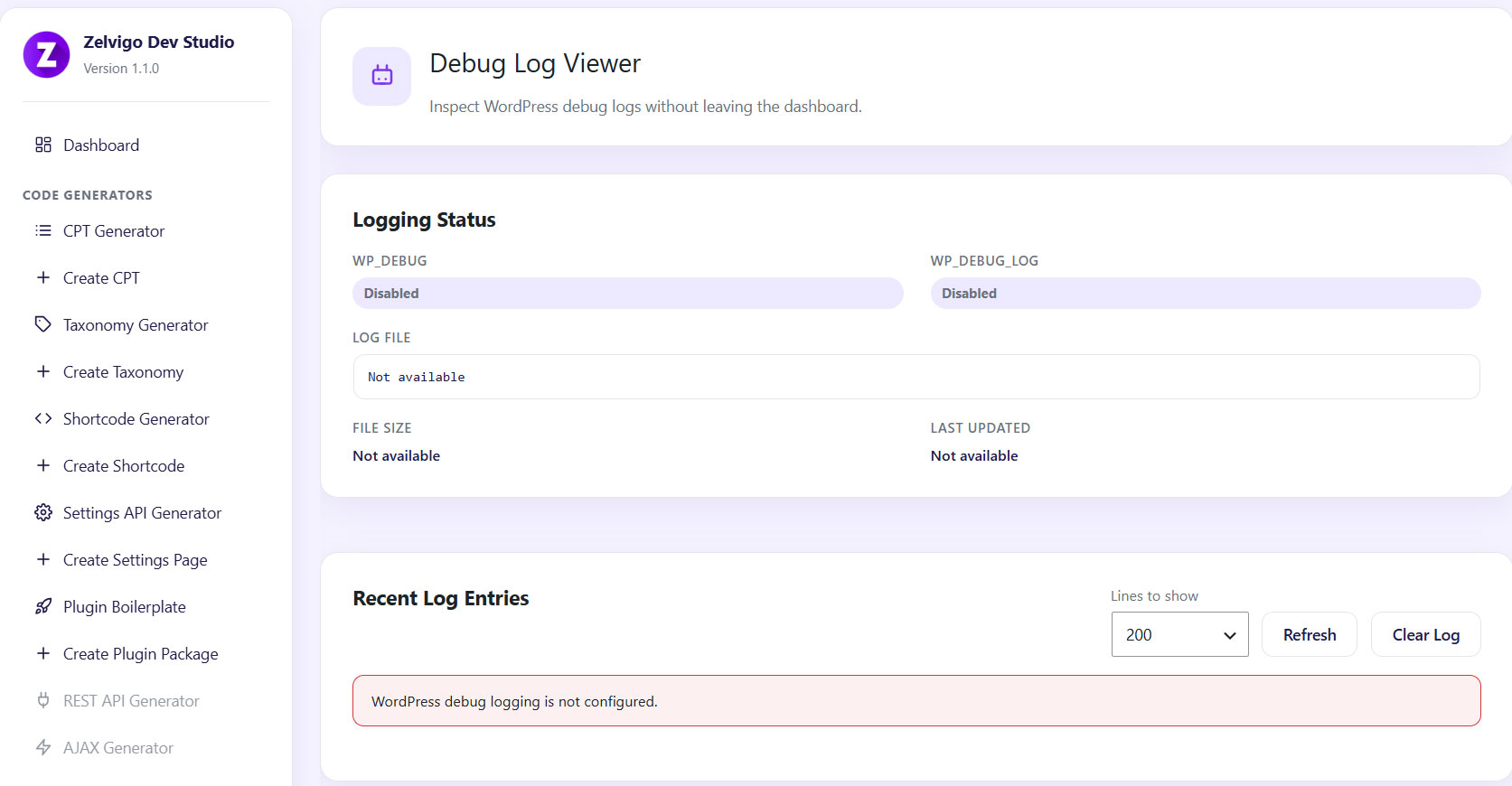
- Read debug.log from wp-admin — no FTP or file manager required
- 100% local and private — Lite does not phone home or send site data anywhere
Whether you search for CPT, custom post type, taxonomy, or WordPress code generator, Zelvigo Dev Studio Lite is built to be the tool you reach for first.
Free tools included in Lite
CPT Generator (Custom Post Type Generator)
Fill in a visual form and get production-ready register_post_type() PHP. Configure singular and plural labels, post type key, public visibility, menu position, REST API support, has_archive, hierarchical mode, supported features, and more — then copy the code into your theme or plugin.
Taxonomy Generator
Build clean register_taxonomy() code for categories, tags, genres, or any custom taxonomy. Link to one or more post types, set hierarchical vs flat structure, REST API options, rewrite rules, and admin UI settings — ready to paste.
Hook Explorer
Browse registered WordPress hooks and callbacks on your site. Find which plugin or theme attached a function to an action or filter — essential for debugging and learning how WordPress loads.
Debug Log Viewer
View your WordPress debug.log file directly inside the admin dashboard. Read-only, fast, and convenient when you do not have FTP or SSH access.
How Lite generation works
Generated CPT and taxonomy code appears in a dark code preview panel for copy and paste. Lite does not:
- Register post types or taxonomies on your site automatically
- Create downloadable plugin ZIP files
- Connect to an external API or cloud service
- Store or transmit your site data
Everything runs locally in your WordPress installation. You stay in full control of where the code goes.
Zelvigo Dev Studio Pro — unlock the full developer workspace
Lite is the free entry point. Zelvigo Dev Studio Pro unlocks cloud-powered generators, live registration, plugin packaging, and advanced developer tools:
Pro code generators
- Shortcode Generator — build shortcodes with attributes and output templates
- Settings API Generator — create WordPress settings pages with a visual field builder and edit saved pages in the builder
- Plugin Boilerplate Generator — scaffold a full plugin structure, bundle CPTs, taxonomies, REST routes, and AJAX handlers, then download a ready-to-install ZIP
- REST API Generator — scaffold custom REST routes and controllers
- AJAX Generator — build wp_ajax handlers with nonce checks, permissions, and sanitized request params
- Admin Page Generator — build admin screens faster (coming in Pro roadmap)
Pro developer tools
- Plugin Conflict Detector — find overlapping hooks and plugin conflicts
- Capability Manager — manage WordPress roles and capabilities (planned)
- Performance Scanner — analyze plugin performance (planned)
- Cloud-powered generation history — save and revisit past generations
Pro also registers CPTs and taxonomies directly on your site, bundles multiple generators into plugin ZIP downloads, and connects to Zelvigo’s cloud engine for faster, richer output.
The bigger picture — what we are building
Zelvigo Dev Studio is not just two generators. It is a complete developer workspace designed to cut WordPress plugin development time from hours to minutes.
Our mission: become the first plugin every WordPress developer installs on a fresh site.
Platform roadmap
- Available in Pro now — Shortcode, Settings API, Plugin Boilerplate, REST API, and AJAX generators; live registration; ZIP downloads
- v1.3 — Admin Page Generator, Cron Generator, Menu Builder, Dashboard Widgets
- v1.4 — Gutenberg Block Generator, Hook Explorer enhancements, Capability Manager, Plugin Conflict Detector
- v1.5 — CSS Analyzer, JavaScript Analyzer, Performance Scanner, Database Helper
- v2.0 — AI Code Generator, Template Library, Export/Import, Module Marketplace, Team Workspace
Lite users get real value today — and a clear path to Pro as the platform grows.
Who is this for?
- WordPress plugin developers
- Freelancers building client sites with custom post types
- Agencies shipping CPT and taxonomy-heavy projects
- SaaS teams using WordPress as a platform
- In-house development teams who want faster, standards-compliant boilerplate
Privacy and trust
Zelvigo Dev Studio Lite runs fully on your WordPress site. Upgrade links open the Zelvigo store in a new tab. Lite does not collect, store, or transmit site data.
Sawir-shaashado
Rakibaad
- Upload the
zelvigo-dev-studio-litefolder to the/wp-content/plugins/directory, or install via Plugins Add New Upload Plugin. - Activate the plugin through the Plugins menu in WordPress.
- Open Zelvigo Dev Studio Lite in the admin sidebar.
- Start with CPT Generator or Taxonomy Generator — fill in the form and copy your code.
SBI
-
Is this a free CPT generator for WordPress?
-
Yes. The CPT Generator is free and runs locally. Enter your post type details, preview the generated
register_post_type()code, and copy it into your plugin or theme. -
Is this a free taxonomy generator for WordPress?
-
Yes. The Taxonomy Generator creates
register_taxonomy()code you can copy and paste. Link taxonomies to any custom post type or built-in post type. -
Does Lite register custom post types or taxonomies automatically?
-
No. Lite shows code for copy and paste only. Automatic registration and live management are available in Zelvigo Dev Studio Pro.
-
Does this plugin phone home or send data to an external server?
-
No. Lite runs entirely on your WordPress site. Store and documentation links open in your browser but do not transmit site data from Lite.
-
Can I use Lite and Pro together?
-
Yes. They use different plugin folders, menu slugs, and text domains. Install both side by side if you want.
-
What is the difference between Lite and Pro?
-
Lite includes CPT Generator, Taxonomy Generator, Hook Explorer, and Debug Log Viewer — all local, all free. Pro adds cloud-powered generators (Shortcode, Settings API, Plugin Boilerplate, REST API, AJAX), live registration, ZIP downloads, conflict detection, and more tools on the roadmap.
-
Who builds Zelvigo Dev Studio?
-
Zelvigo Technologies — a team focused on WordPress developer productivity. Learn more at zelvigo.com.
Dibu-eegisyo
Ma jiraan wax dibu-eegis ah oo ku saabsan kaabahan.
Ka-qaybgalayaasha & Horumariyayaasha
“Zelvigo Dev Studio Lite – WordPress CPT & Taxonomy Generator” waa softiweer il furan. Dadka soo socda ayaa wax ku biiriyay kaabahan.
Ka-qaybgalayaasha
Ku tarjun “Zelvigo Dev Studio Lite – WordPress CPT & Taxonomy Generator” luqaddaada.
Ma xiisaynaysaa horumarinta?
Baadh koodka, fiiri bakhaarka SVN, ama iska qor diiwaanka horumarinta adigoo adeegsanaya RSS.
Isbeddellada
1.0.1
- Add AJAX Generator to Pro feature previews in the dashboard, sidebar, and upgrade page
- Update Pro feature list and readme to match current Zelvigo Dev Studio Pro releases
1.0.0
- Initial WordPress.org release
- Free CPT (custom post type) code generator with copy/paste preview
- Free taxonomy code generator with copy/paste preview
- Hook Explorer — browse registered hooks and callbacks
- Debug Log Viewer — read debug.log from the admin
- Pro feature preview and upgrade page